Edit PDFs Directly in Your Browser
Add text, shapes, stamps, signatures, and more to any PDF — a full editing toolkit that runs 100% locally.
Free & full-featured · No uploads · Works offline
OUR BEST FEATURES
Everything you need to edit a PDF
From simple text additions to complex annotations, DraftPDF covers the full spectrum of PDF editing tasks.

Free-text annotations: Click anywhere to add a text box with full font and colour control.
Shapes & markup: Draw rectangles, ellipses, polygons, lines, and arrows with customisable stroke styles.
Stamps & signatures: Drop built-in stamps or create your own for approvals, reviews, and sign-offs.
ADVANCED FEATURES
Professional-grade tools for power users
Measurement tools, callouts, and engineering mark-up — everything a technical reviewer needs.
Measurement tools: (Coming soon) Calibrated length, area, and perimeter measurements with scale factor support.
Callout annotations: Leader-line callouts that connect a note to a specific point on the drawing.
Layer-aware editing: Select, move, resize, and delete individual annotation objects with precision.
Frequently Asked Questions
Everything you need to know before you get started.
What can I edit in a PDF?
Supported edits
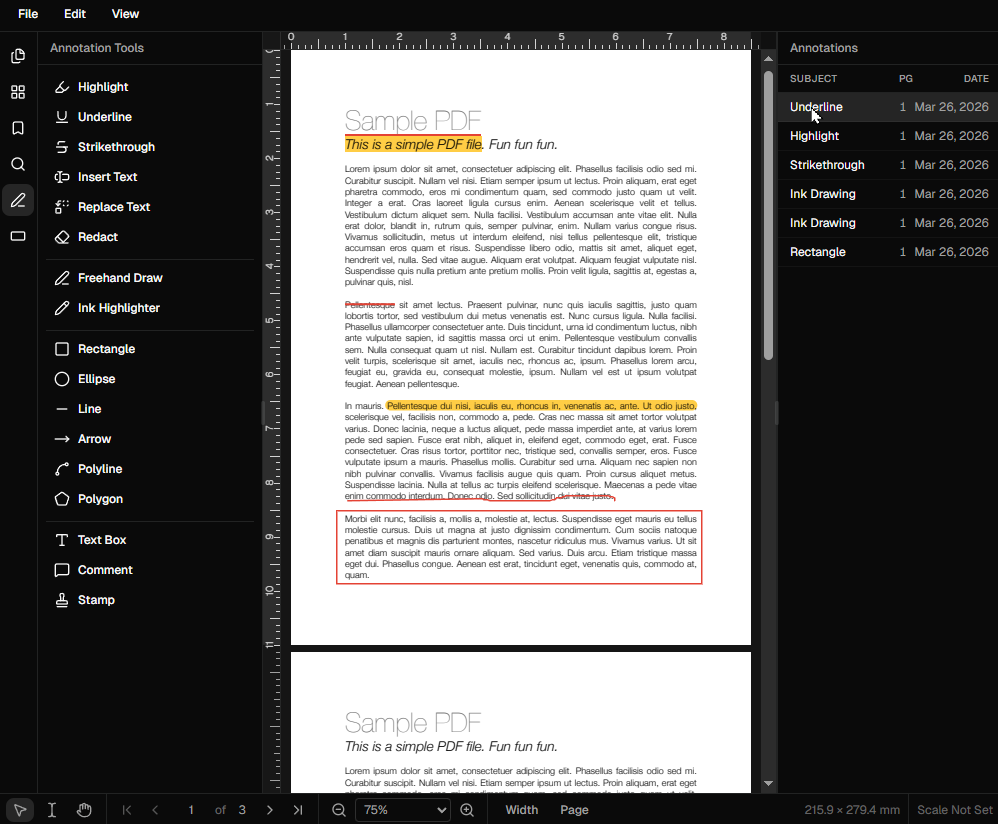
DraftPDF supports adding and editing annotations: free text, shapes, stamps, highlights, underlines, and strikethroughs. It focuses on annotation-layer editing rather than modifying original body text. Measurement tools and callouts are coming soon.
Does it work on all browsers?
Browser compatibility
DraftPDF works on any modern browser that supports WebAssembly — Chrome, Edge, Firefox, and Safari are all supported. No browser extensions are required.
Does it work offline?
Offline support
Yes. Once the editor has loaded, it works entirely offline. Your documents are never transmitted anywhere, making it safe to use on confidential files.
How do I save my edits?
Saving & exporting
Click the save/download button in the top menu. DraftPDF flattens your annotations into the PDF and downloads the result to your device. Edits remain on the annotation layer so you can continue editing later.
Ready to get started?
Open DraftPDF in your browser — no account, no install, no data ever leaves your device.
Free & full-featured · Works offline · No sign-up required
Related Tools
Merge PDFs
Open multiple PDF files and combine them into one document in seconds. Free, browser-based PDF merger — no uploads, no installs.
➕Insert Pages
Add pages from another PDF or insert blank pages anywhere in your document. Free, browser-based, no uploads required.
✂️Delete Pages
Remove unwanted pages from any PDF document instantly. Browser-based, no uploads, no installs.
🔖PDF Bookmarks
Create, edit, and organise PDF bookmarks (outlines) to make navigation effortless. Free, browser-based.