Create Fillable PDF Forms in Your Browser
Design interactive PDF forms, place widgets precisely, and switch into fill mode to test the result before you export.
Free & full-featured · No uploads · Works offline
FORM AUTHORING
Build and edit interactive PDF forms
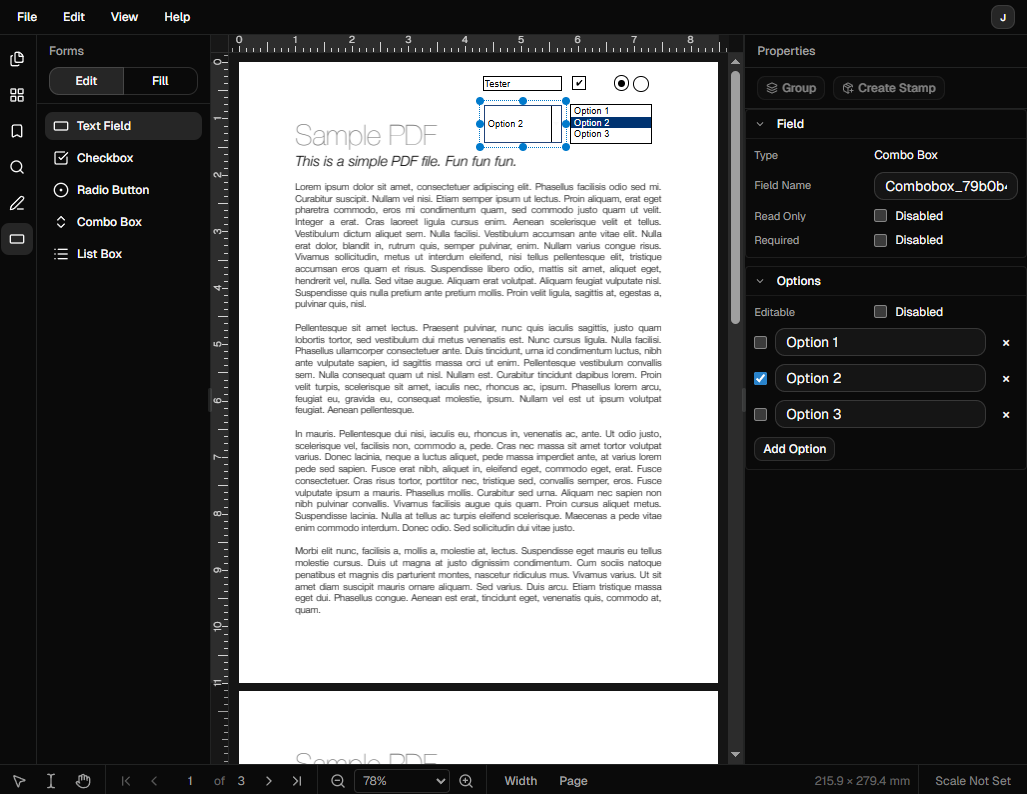
DraftPDF includes dedicated form design tooling for creating AcroForm widgets directly inside the editor.
Form field creation: Add text fields, checkboxes, radio buttons, combo boxes, and list boxes from the Forms panel.
Design and fill modes: Switch between editing the form layout and filling the form so you can test interaction before saving.
Widget properties: Edit field names, required and read-only settings, default values, and other widget-specific options from the properties panel.
Frequently Asked Questions
Everything you need to know before you get started.
How do I create a fillable PDF form?
Step-by-step guide
Open your document in DraftPDF, switch to the Forms panel, choose a field type, and place it on the page. You can then edit the widget properties and switch to fill mode to test it.
What form fields are supported?
Supported widgets
DraftPDF supports text fields, checkboxes, radio buttons, combo boxes, and list boxes for interactive AcroForm authoring.
Can I edit existing form fields?
Editing existing forms
Yes. In design mode you can select existing widgets, move or resize them, and update their field properties from the right panel.
Can users fill the form after export?
Export compatibility
Yes. DraftPDF creates standard PDF form widgets, so exported documents can be opened and filled in common PDF viewers that support AcroForms.
Ready to get started?
Open DraftPDF in your browser — no account, no install, no data ever leaves your device.
Free & full-featured · Works offline · No sign-up required
Related Tools
Merge PDFs
Open multiple PDF files and combine them into one document in seconds. Free, browser-based PDF merger — no uploads, no installs.
➕Insert Pages
Add pages from another PDF or insert blank pages anywhere in your document. Free, browser-based, no uploads required.
✂️Delete Pages
Remove unwanted pages from any PDF document instantly. Browser-based, no uploads, no installs.
🔖PDF Bookmarks
Create, edit, and organise PDF bookmarks (outlines) to make navigation effortless. Free, browser-based.